
Cybersecurity for Startups: 10 Practices to Protect Your Business From Cyber Attacks
Last updated May 17, 2026
Cybersecurity for startups often gets dismissed as something to worry about "later". After all, cyber attack stories only hit the news when they're on a massive scale. The type where millions of users' information is stolen, or billions are lost in revenue. This may have conditioned some of us (even if we don't truly believe … Read more →
Cybersecurity for startups often gets dismissed as something to worry about “later”. After all, cyber attack stories only hit the news when they’re on a massive scale. The type where millions of users’ information is stolen, or billions are lost in revenue. This may have conditioned some of us (even if we don’t truly believe it) to think that cybersecurity is only a thing big businesses should take seriously, to protect money, customer information, or some other important secret.
The reality, however, is a little more grim than that. With a plethora of statistics, we will show you why Cybersecurity is just as important for startups as it is for big businesses. Then we will show you how to insulate yourself against cyber attacks and when you might need to hire a professional ‘insulator’.
Let’s get to it!
What is Cybersecurity?
Cybersecurity is the practice of protecting your computer systems, networks, data, and digital assets from unauthorized access, theft, damage, or disruption by malicious actors, collectively known as cyber attacks.
Now, to the next question…
Why are Startups targets of Cyberattacks?
Embroker’s 2024 Cyber Risk Index Report showed that 81% of the startups in the study had experienced a Cyberattack. This goes to show that startups are frequent targets of cyberattacks.
Here’s why you’re in the crosshairs:
- Weak defenses with valuable assets. Around 50% of small businesses have no cybersecurity measures in place at all, yet you’re sitting on valuable data—customer information, intellectual property, financial records, and product secrets. It’s an easy target with high reward.
- You’re a backdoor to bigger companies. If your startup integrates with enterprise clients or processes data for larger partners, compromising you gives attackers access to those more lucrative targets. Supply chain attacks work because the weakest link—often a small vendor or partner—becomes the entry point.
- Slow detection means extended access. Without monitoring systems or dedicated security teams, startups often don’t discover breaches for months. Attackers exploit this, knowing they’ll have extended, undetected access to your systems before you even realize something’s wrong.
- Disproportionate impact. The average cost of a data breach for a small business is approximately $3.3 million. Now, a $3.3 million breach might be a bad quarter for a Fortune 500 company, but it means a lot more to a startup. Attackers know this leverage can lead to quicker ransomware payments and less resistance.
The Implication? When a cyber attack happens to a small business, customer trust evaporates, understandably so. Combine that with regulatory fines, with a sprinkle of operational paralysis, and you have a real Armageddon on your hands. This type of pattern has been reported to result in 80% of companies closing their doors after a significant cyber-attack.
Common Cybersecurity Threats Startups Face
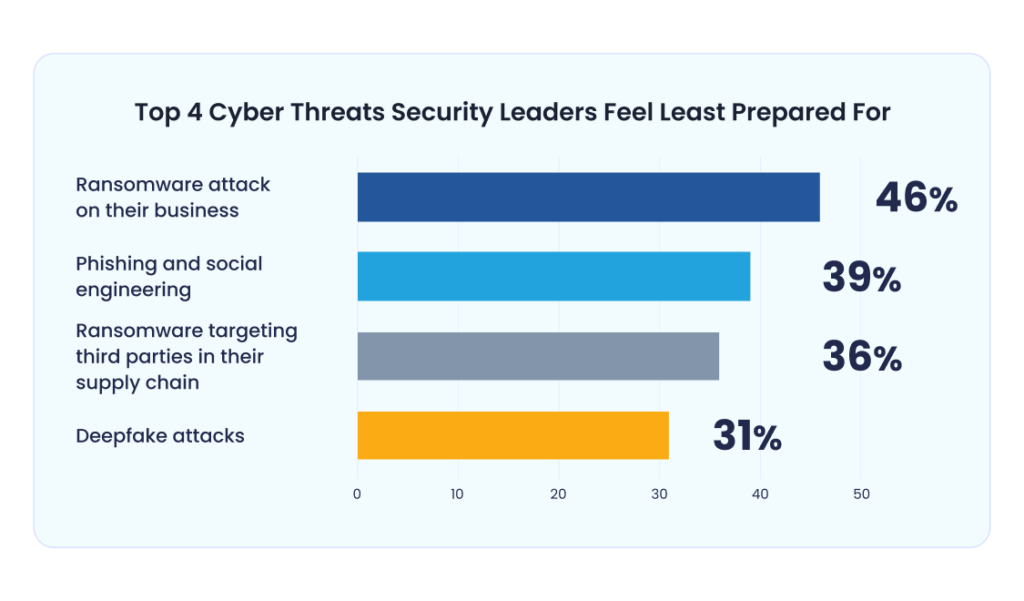
Understanding what you’re up against is the first step to defending yourself. Here are the most common threats targeting startups:
- Phishing and Social Engineering
This is the #1 cause of security breaches. Attackers don’t need to break through sophisticated defenses when they can simply trick your employees into handing over credentials. A convincing email that looks like it’s from your CEO requesting a wire transfer, a fake login page for your AWS console, a LinkedIn message from a “recruiter” with a malicious attachment—these attacks work because they exploit human psychology, not technical vulnerabilities.
And small business employees? They are particularly vulnerable here, with that 350% higher rate of social engineering attacks compared to larger enterprises. Why? Attackers know smaller teams often lack security training and are more likely to trust unexpected requests, especially in fast-moving startup environments where urgency is the norm.
- Ransomware
As the name implies, Ransomware is the cyber equivalent of kidnapping for ransom. In cyber lingo, Ransomware attacks encrypt your data and demand payment for the decryption key. They sometimes identify critical data, and could time their attacks for maximum impact (right before a funding round, product launch, or major deal closing). Even if you pay (which you shouldn’t), there’s no guarantee you’ll get your data back, and you’ve just funded future attacks.
- Data Breaches
Data breaches encompass unauthorized access to customer data, intellectual property, or internal systems. These often result from misconfigured cloud storage (exposed S3 buckets are embarrassingly common), stolen credentials, or unpatched vulnerabilities.
- Insider Threats
Not all threats come from outside. Malicious insiders (disgruntled employees) or negligent ones (someone clicking a phishing link, using weak passwords, or accidentally exposing credentials in a public GitHub repo) cause significant damage.
- API Vulnerabilities
If you’re building a SaaS product, your APIs are both your product and your attack surface. Broken authentication, excessive data exposure, lack of rate limiting, and insufficient logging are frequently exploited in startup breaches.
- DDoS Attacks
Distributed Denial of Service attacks overwhelm your servers with traffic, making your service unavailable to legitimate users. While not a data breach, DDoS attacks can cripple your operations, damage your reputation, and sometimes serve as cover for other attacks happening simultaneously.
Cybersecurity Practices to Stay Safe
Cybersecurity in 2026 isn’t an “IT problem” you can defer. It’s a business survival issue that starts on day one. The good news? You don’t need an enterprise security budget or a dedicated CISO to protect your startup, just the right habits. These aren’t suggestions or “nice to haves.” These are necessary steps to stay safe.
Here are eight (8) steps to take in the right direction:
1. Access Control and Authentication
Implement multi-factor authentication (MFA) everywhere. This is non-negotiable. Every service—email, cloud infrastructure, code repositories, admin panels, financial systems—should require MFA. Stolen passwords become useless if the attacker doesn’t have the second factor. Use authenticator apps or hardware tokens, not SMS (which can be intercepted).
Use strong password policies and password managers. Require complex, unique passwords for every service. Humans are terrible at remembering dozens of strong passwords, so mandate a password manager (1Password, Bitwarden, LastPass) across your team. This solves both security and convenience.
Principle of least privilege. Users should only have access to what they need to do their jobs, nothing more! Your marketing intern doesn’t need access to your production database. Your contractor doesn’t need admin access to your AWS account. Review permissions regularly and restrict by default.
Regular access reviews and offboarding procedures. Quarterly (at minimum), audit who has access to what. When someone leaves—employee, contractor, advisor—immediately revoke all access. Former employees with active credentials are low-hanging fruit for attackers.
2. Data Protection
Encrypt data at rest and in transit. All sensitive data should be encrypted when stored (at rest) and when transmitted (in transit). Use HTTPS everywhere, encrypt databases, ensure your cloud storage uses encryption. This way, even if an attacker accesses your data, they can’t read it without the encryption keys.
Regular backups (and test restoration). Back up critical data regularly—daily for critical systems, weekly for everything else. But here’s the key: actually test that you can restore from backups. Untested backups are worthless when you need them. It’s advisable to store backups in a separate location from production systems so ransomware can’t encrypt both.
Data classification (know what’s sensitive). Not all data is equally valuable or risky. Classify your data (public, internal, confidential, restricted) and apply appropriate security controls. Customer payment information requires different protection than your company blog content.
Secure deletion of unnecessary data. Don’t keep data you don’t need. The less sensitive data you store, the less you’re exposed if breached. Implement data retention policies and securely delete data when it’s no longer needed. This also helps with GDPR/CCPA compliance.
3. Endpoint Security
Antivirus/anti-malware on all devices. Every laptop, phone, and tablet accessing company systems should have updated antivirus protection. Modern solutions go beyond signature-based detection to include behavioral analysis and threat intelligence.
Keep systems and software updated. Enable automatic updates for operating systems and applications. The vast majority of breaches exploit known vulnerabilities that already have patches available—attackers count on you being lazy about updates.
Mobile device management for remote teams. If your team works remotely, implement MDM to enforce security policies on devices accessing company data—encryption requirements, remote wipe capability if devices are lost, screen lock timeouts, restrictions on jailbroken/rooted devices.
Secure personal devices if BYOD. If employees use personal devices for work, extend your security requirements to those devices. Consider providing company devices instead to maintain better control over security posture.
4. Network Security
Use VPNs for remote access. Any remote access to internal systems should go through a VPN to encrypt traffic and verify identity. Never expose internal systems directly to the internet.
Secure Wi-Fi networks. Use WPA3 encryption, change default passwords on routers, and separate guest networks from corporate networks. For remote workers on home networks, provide guidance on securing their home Wi-Fi.
Network segmentation where appropriate. As you grow, segment your network so production environments are isolated from development, administrative systems are separated from general use, and sensitive data has additional barriers. Breaching one segment shouldn’t compromise everything.
Firewall configuration. Configure firewalls to block unnecessary inbound traffic and monitor outbound traffic for anomalies. Default deny inbound, explicit allow only what’s needed.
5. Application Security
Secure coding practices. Train developers on secure coding—input validation, output encoding, parameterized queries to prevent SQL injection, proper authentication, and session management. Use linters and static analysis tools to catch common vulnerabilities during development.
Regular vulnerability scanning. Use automated tools to scan your applications and infrastructure for known vulnerabilities. Address findings based on severity—critical vulnerabilities should be patched immediately.
Penetration testing (when you can afford it). Once you have a budget (typically Series A+), hire professional penetration testers to simulate real attacks and find vulnerabilities before attackers do. Start with annual testing, increase frequency as you grow.
Secure APIs and third-party integrations. Implement proper authentication (OAuth 2.0, API keys with rotation), rate limiting to prevent abuse, input validation, and comprehensive logging. Review the security posture of every third-party service you integrate.
Input validation and sanitization. Never trust user input. Validate, sanitize, and encode all inputs to prevent injection attacks (SQL injection, XSS, command injection). This is fundamental secure coding.
6. Cloud Security
Understand the shared responsibility model. Your cloud provider secures the infrastructure; you secure what you put on it. AWS secures its data centers; you secure your S3 bucket configurations. Know where your responsibility begins.
Proper configuration of cloud services. This is where many breaches happen. Never make S3 buckets public unless absolutely necessary. Use IAM roles properly with least privilege. Enable logging and monitoring. Rotate credentials. Use security groups restrictively.
Regular audits of cloud permissions. Who has access to your cloud console? What permissions do service accounts have? Review regularly and tighten. Tools like AWS IAM Access Analyzer can help identify overly permissive policies.
Use cloud-native security tools. AWS GuardDuty, Azure Security Center, GCP Security Command Center—these tools monitor for threats and misconfigurations. They’re not expensive and catch many common mistakes.
7. Vendor and Third-Party Risk
Vet vendors’ security practices. Before integrating a third-party tool or service, review their security. Do they have SOC 2? How do they handle data? What happens if they’re breached? Not every vendor needs enterprise-grade security, but you should know what you’re getting.
Review security in contracts/SLAs. Include security requirements in vendor agreements—data handling, breach notification timelines, liability, right to audit. Don’t just trust; verify and codify.
Limit vendor access to what’s necessary. If a vendor needs access to your systems, grant only what they need and revoke it when the engagement ends. Use separate credentials for vendor access so you can track and control it independently.
Monitor third-party integrations. Keep an inventory of all third-party tools and services. Review regularly—do you still need that tool? Is it still secure? Third-party risks evolve, so monitoring should be ongoing.
8. Building a Security-First Culture
Technology alone won’t save you if your people are the weak link. Security must be cultural.
Security starts with leadership buy-in. If founders treat security as an IT checkbox, the team will too. Make it clear that security is everyone’s responsibility and that you take it seriously at the top.
Security awareness training for all employees. Quarterly training at minimum—phishing awareness, password hygiene, recognizing social engineering, data handling policies, and incident reporting. Make it engaging, not just a compliance exercise.
Regular phishing simulations. Run simulated phishing campaigns to test and train your team. Track who clicks, provide immediate feedback, and improve over time. This is one of the most effective training tools.
Clear security policies and procedures. Document acceptable use policies, password requirements, data handling procedures, bring-your-own-device policies, and incident response procedures. Make them accessible and actually followed, not just filed away.
Incident response protocols. Have a plan for when (not if) something goes wrong. Who do you call? How do you contain the breach? When do you notify customers, authorities, or the media? Practice this before you need it.
Encourage reporting of security concerns without blame. Create a culture where people feel safe reporting potential security issues, mistakes, or suspicious activity without fear of punishment. A culture of blame leads to cover-ups, which leads to worse breaches.
When to Hire a Cybersecurity Professional
I know we said you don’t need an enterprise security budget or a dedicated CISO to protect your startup, but sometimes, you do.
You can handle basic security hygiene yourself early on, but there comes a point where you need dedicated expertise. Here are the pointers:
- You’re handling sensitive data at scale. If you’re processing health information (HIPAA), payment data (PCI DSS), or have tens of thousands of users whose personal information you’re responsible for, you need professional security guidance.
- You’re pursuing SOC 2 or other compliance certifications. Enterprise customers increasingly require SOC 2 Type II. Getting through your first SOC 2 audit without security expertise is painful and often unsuccessful. A fractional CISO or security consultant can guide you through compliance efficiently.
- You’ve raised Series A or beyond. At this stage, investors and customers expect professional security practices. You have the resources to invest in security, and the cost of not doing so becomes existential.
- You’re experiencing or recovering from a security incident. If you’ve been breached, you need professional incident response immediately. Don’t try to handle this alone—you’ll miss critical containment steps, evidence, and recovery procedures.
- You’re expanding internationally or into regulated industries. Different jurisdictions and industries have different security and compliance requirements. Professional guidance helps you navigate these requirements efficiently.
- Your engineering team lacks security expertise. Most startup engineers are generalists focused on shipping features. Security requires specialized knowledge—threat modeling, vulnerability assessment, secure architecture design, and compliance frameworks. If your team lacks this expertise (and most do), bring in help.
What to look for: Beyond technical skills, you want someone who understands startup constraints, can communicate security concepts to non-technical stakeholders, balances security with business needs, and helps build security into your culture rather than bolting it on afterward.
Wrap Up
Cybersecurity isn’t an IT problem you can defer until you’re “big enough.” Start now. Even if “now” means implementing MFA and password managers this week. Around 50% of small businesses have no cybersecurity measures in place at all. No plan, no policies, no preparation. They’re essentially leaving the front door wide open while hoping nobody notices. Don’t be that guy.
The best time to implement security was at the founding. The second-best time is today.
FAQs
What is the #1 cause of security breaches?
Phishing and social engineering attacks are the leading cause of security breaches. Rather than exploiting technical vulnerabilities, attackers manipulate people into revealing credentials, clicking on malicious links, or transferring money.
The solution: implement MFA everywhere (so stolen credentials alone aren’t enough), use password managers, conduct regular security training, and run phishing simulations to keep your team vigilant.
Will unplugging a computer stop a hacker?
If you suspect an active attack on a specific computer, physically disconnecting it from the network (unplugging Ethernet or disabling Wi-Fi) can stop the attacker from accessing that machine remotely and prevent malware from spreading to other systems. However, this is only a temporary containment measure during an active incident. Simply unplugging doesn’t remove malware, recover stolen data, or address the vulnerability that allowed the attack.
After disconnecting, you need proper incident response: investigate how the breach occurred, assess what was compromised, remediate the vulnerability, and potentially restore from clean backups.
How often should we do security training?
Quarterly security training is the minimum for all employees, with more frequent micro-trainings (monthly reminders, short videos, or security tips) being even better. New employees should receive security training during onboarding before they get system access.