
Email Spoofing: 7 Ways To Protect Your Startup
Last updated May 17, 2026
In February 2024, European retail giant Pepco Group lost €15.5 million (approximately $16.8 million) to a phishing attack (through email spoofing) targeting its Hungarian operations. We’ve already discussed cybersecurity and how to insulate your startup against cyberattacks in general, but we’ve decided to hone in on email spoofing because of how common it is. The … Read more →
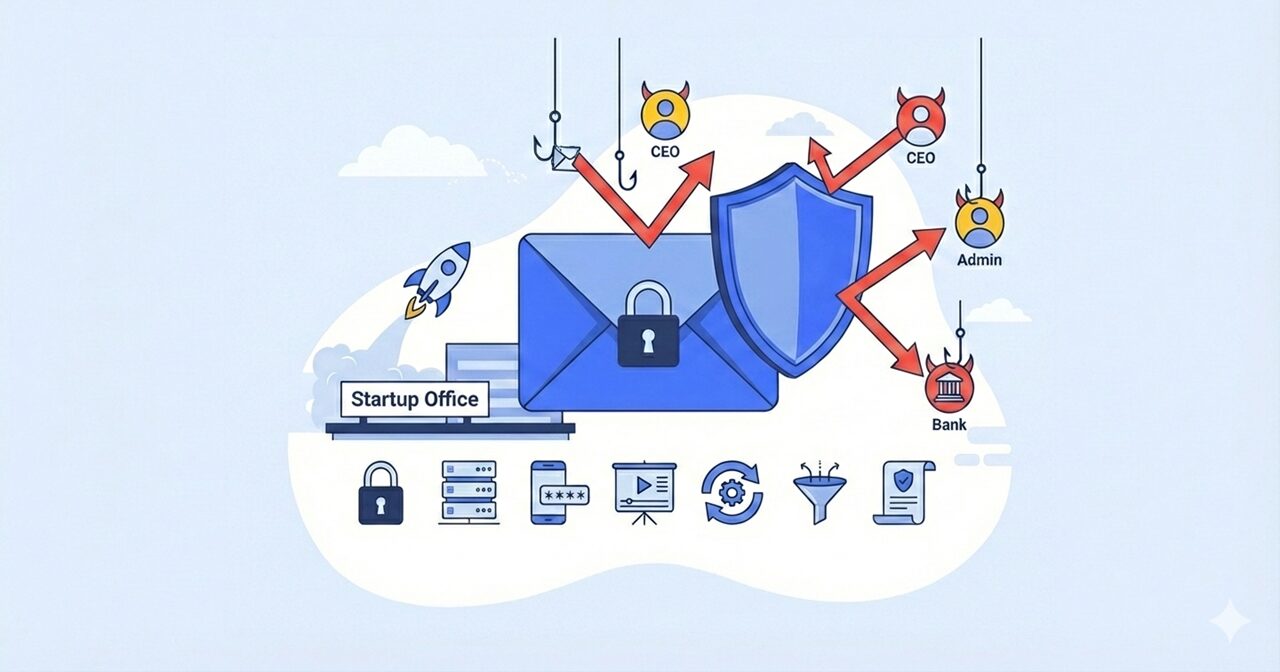
In February 2024, European retail giant Pepco Group lost €15.5 million (approximately $16.8 million) to a phishing attack (through email spoofing) targeting its Hungarian operations. We’ve already discussed cybersecurity and how to insulate your startup against cyberattacks in general, but we’ve decided to hone in on email spoofing because of how common it is.
The FBI’s Internet Crime Complaint Center reported that losses from business email compromise attacks reached a staggering $16.6 billion in 2024.
Email spoofing remains one of the most financially devastating cyber threats facing businesses today. Ironically, it’s also one of the most preventable. We are going to comprehensively walk you through everything you need to know to protect your startup from becoming the next victim.
Let’s get to it!
What is Email Spoofing? How It Works
Email spoofing is the practice of sending emails with a forged sender address, making the message appear to come from someone other than the actual source. Think of it as the digital equivalent of forging someone’s signature on a check—except it’s far easier to execute and much harder to detect.
The vulnerability exists because the Simple Mail Transfer Protocol (SMTP), the system that handles email delivery, was designed in 1982 without built-in sender verification. This means attackers can manipulate the “From” field to display any email address they choose, be it your CEO’s email, your bank’s address, or a trusted vendor.
Unlike traditional phishing (which casts a wide net hoping someone will bite), email spoofing is often highly targeted relying on a reasonable level of oversight to attack unsuspecting vicitms. Attackers research their victims, study communication patterns, and craft messages that perfectly mimic legitimate business correspondence.
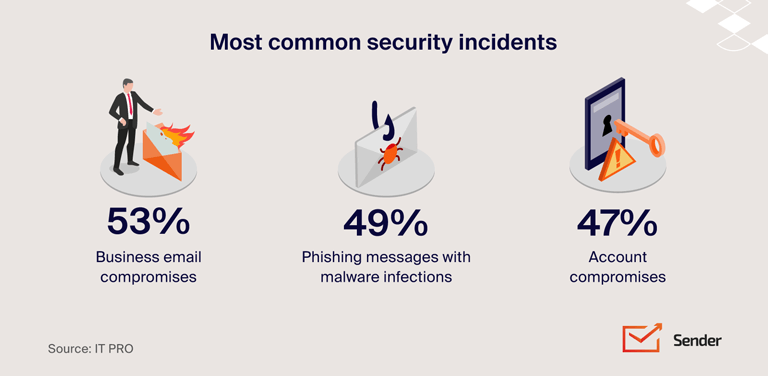
The attack typically unfolds in stages: First, cybercriminals research your company and identify key personnel. They study your vendors, understand your approval processes, and learn how executives communicate. Then they create convincing spoofed emails requesting wire transfers, updating payment details, or asking for sensitive information. Because these requests appear legitimate and often create a false sense of urgency, employees comply without verifying through alternative channels.
Email Spoofing Risks: What Happens When Your Startup is Targeted
The consequences of email spoofing extend far beyond the immediate financial loss. Here’s what’s really at stake for your startup:
Financial Loss
The average loss per business email compromise incident is $137,000, with 83% of these financial losses being unrecoverable. For many startups operating on tight budgets, a single successful attack can be existential.
Data Breaches
Email spoofing attacks don’t always target money directly. Attackers frequently use these techniques to steal employee personal information, customer data, intellectual property, or trade secrets. This stolen data can be sold on the dark web, used for identity theft, or leveraged for future, more sophisticated attacks against your company or clients.
Reputation Damage
When customers or partners learn that your startup has been compromised, trust evaporates. If attackers use your email system to target your customers or vendors, the reputational damage can be catastrophic. You may lose existing clients, struggle to attract new ones, and face a long, expensive journey to rebuild your brand’s credibility.
Operational Disruption
Responding to an email spoofing attack consumes massive resources. Your team will spend countless hours investigating the breach, coordinating with law enforcement, notifying affected parties, implementing new security measures, and managing the crisis. This diverts attention from running your business and growing your startup.
Legal and Compliance Issues
Depending on your industry and location, you may face regulatory penalties, lawsuits from affected parties, and mandatory disclosure requirements that further damage your reputation.
How to Protect Your Startup Against Email Spoofing: 7 Essential Security Measures
Now for the good news: email spoofing is highly preventable when you implement the right combination of technical controls, policies, and training. Here are the seven (7) essential measures every startup should adopt:
1. Implement Email Authentication Protocols (SPF, DKIM, and DMARC)
Email authentication protocols are your first and most important line of defense. These three technologies work together to verify that emails claiming to be from your domain are actually legitimate:
SPF (Sender Policy Framework) specifies which mail servers are authorized to send emails from your domain. When an email arrives claiming to be from your company, the recipient’s email server checks whether it came from one of your approved servers.
DKIM (DomainKeys Identified Mail) adds a digital signature to your outgoing emails. This signature proves the email hasn’t been altered in transit and confirms it originated from your domain.
DMARC (Domain-based Message Authentication, Reporting and Conformance) builds on SPF and DKIM by telling recipient servers what to do with emails that fail authentication checks—reject them, quarantine them, or allow them through while monitoring the results.
How to set them up: Work with your IT team or email service provider to add the appropriate DNS records to your domain. Most major email providers (Google Workspace, Microsoft 365, etc.) offer step-by-step guides for implementing these protocols. Configure DMARC to start in monitoring mode, then gradually move to enforcement as you verify legitimate email flows aren’t being blocked.
2. Deploy Advanced Email Security Solutions
While built-in email filters catch obvious spam, they struggle with sophisticated spoofing attempts. 50% of all email phishing attacks, including business email compromise, evade secure email gateways (SEGs).
Invest in advanced email security software that uses artificial intelligence and machine learning to detect anomalies in email patterns, sender behavior, and content. These systems can flag emails from lookalike domains, detect unusual sending patterns, identify suspicious language patterns, and analyze links and attachments for malware.
The trick here is to look for solutions that offer real-time threat intelligence, integration with your existing email platform, user-friendly interfaces that don’t overwhelm employees with false positives, and detailed reporting and analytics to track attack patterns.
3. Establish Employee Security Awareness Training Programs
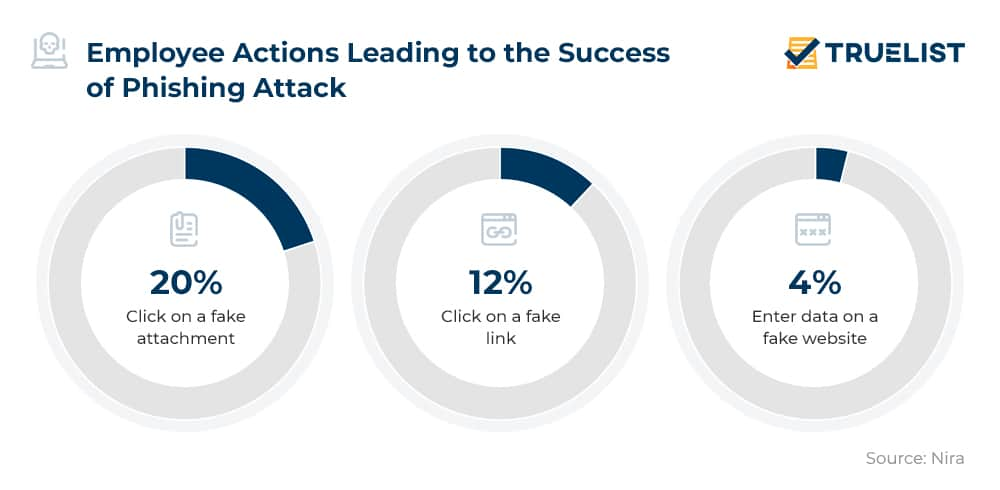
Your employees are both your greatest vulnerability and your strongest defense. 98% of affected employees don’t report BEC attacks, meaning most incidents go undetected unless specifically flagged. This makes comprehensive training essential.
Regular training should cover how to identify spoofed email addresses and lookalike domains, red flags for business email compromise (urgency, unusual requests, payment changes), proper verification procedures before taking action on financial requests, and what to do when they suspect an attack.
Run simulated phishing campaigns to test employee awareness and identify who needs additional training. Make these exercises realistic but educational rather than punitive. The goal is to build a security-conscious culture where employees feel comfortable reporting suspicious emails without fear of ridicule or punishment.
4. Create Verification Procedures for Sensitive Transactions
The single most effective way to prevent successful spoofing attacks is implementing strict verification procedures for sensitive requests. Establish clear protocols that require out-of-band verification (using a different communication channel) for any financial transactions, password resets, changes to vendor payment information, or requests for sensitive data.
For example, if an employee receives an email requesting a wire transfer, they should be required to verify the request by calling the requester using a phone number from the company directory, not one provided in the email. This simple step would have prevented the Pepco attack and countless others.
Create approval workflows that require multiple people to sign off on financial transactions above certain thresholds. Implement a policy where urgent requests for money or sensitive information automatically trigger additional scrutiny rather than immediate compliance. Document these procedures clearly and ensure every employee understands them.
5. Enable Multi-Factor Authentication (MFA) Across All Systems
Multi-factor authentication adds an extra layer of security beyond passwords. Even if attackers steal employee credentials through phishing, they can’t access your systems without the second factor (typically a code sent to a phone or generated by an authentication app).
Implement MFA on all email accounts, financial systems and payment platforms, cloud storage and file sharing services, VPNs and remote access tools, and administrative accounts with elevated privileges.
Also make sure to use phishing-resistant MFA methods like hardware security keys or biometric authentication when possible, especially for high-value accounts.
6. Monitor and Protect Your Domain Reputation
Attackers often register domains that are visually similar to yours—replacing letters with numbers, adding hyphens, or using different top-level domains (.co instead of .com).
Proactively register common variations of your domain name to prevent others from using them maliciously. Use domain monitoring services that alert you when similar domains are registered or when your brand is being impersonated online. Consider implementing trademark monitoring to catch unauthorized use of your company name.
Set up Google Alerts for your company name combined with terms like “scam,” “fraud,” or “phishing” to catch potential impersonation campaigns early. Monitor your brand’s online reputation and respond quickly to any suspicious activity.
7. Develop an Incident Response Plan for Email Security Breaches
Despite your best efforts, you should prepare for the possibility of a successful attack. Having a clear incident response plan ensures you can act quickly to minimize damage.
Your plan should include immediate containment steps (identifying affected systems, changing compromised credentials, notifying your bank to attempt fund recovery), investigation procedures to determine the attack’s scope and how it occurred, communication protocols specifying who informs employees, customers, law enforcement, and potentially the media, and recovery steps to restore normal operations and implement additional safeguards.
Designate specific people responsible for each aspect of the response and conduct regular tabletop exercises to ensure your team knows what to do when an actual incident occurs. Courts and insurers determine whether your business exercised “reasonable care” in verifying payment instructions, and if proper procedures weren’t followed, you may be liable for the entire loss.
Wrap Up
Email spoofing represents one of the most serious yet preventable threats facing startups today. With 63% of organizations experiencing business email compromise last year, the question isn’t whether you’ll be targeted, it’s whether you’ll be ready when attackers come knocking. Don’t wait until you’re featured in the next headline about a devastating phishing attack. Take action today! Your business, your employees, and your customers are counting on it.
FAQs
What are the 5 types of business email compromise scams?
Business email compromise attacks include account compromise (hijacking employee email for fraudulent payments), attorney impersonation (targeting junior employees by posing as lawyers), CEO fraud (impersonating executives to request wire transfers), data theft (stealing employee or customer information), and fake invoice scams (posing as vendors with altered payment details).
Each type exploits trust and authority in different ways, but all share the common goal of tricking employees into taking actions that benefit the attacker.
How to spot email spoofing?
The devil is in the details. Always check the actual email address, not just the display name—attackers often use names that match legitimate contacts while the actual address is completely different. Look for slight misspellings in domains (like “arnaz0n.com” instead of “amazon.com”). Be suspicious of unexpected urgent requests, especially for money or sensitive information.
Watch for unusual language, grammar errors, or a tone that doesn’t match the supposed sender’s typical communication style. Check the reply-to address, which attackers often change to direct responses to accounts they control. Hover over links before clicking to see if the URL matches the stated destination.
What is a red flag for business email compromise?
Major red flags include urgent requests creating false time pressure, confidential matters requiring immediate action, unusual payment requests especially via wire transfer or gift cards, requests bypassing normal approval processes, and communications from executives using unfamiliar email patterns or language.
Be especially wary of emails received outside normal business hours or that ask you to keep information confidential from your colleagues. Legitimate business requests rarely require secrecy from your own team.
What are the 4 P’s of phishing?
The 4 P’s are Pretext (establishing a believable scenario), Promise (offering rewards or exclusive access), Pretense (creating urgency or fear), and Payoff (the attacker’s desired outcome like stolen credentials or malware installation).
What emails should you not open?
Never open emails from unknown senders asking to verify accounts, messages with obvious typos or poor grammar, emails with unexpected attachments (especially ZIP files, PDFs, or invoices), and authority impersonation emails claiming to be from banks, the IRS, or Microsoft without independent verification.
Remember that legitimate organizations will never ask you to verify sensitive information via email. If you’re unsure about an email’s legitimacy, contact the supposed sender through official channels listed on their website, not using contact information provided in the suspicious email itself.