
Interact Review 2026: How to Generate Leads Through Quizzes
Last updated May 17, 2026
Long before quizzes became a social media phenomenon, Interact was founded in 2014 with a simple yet powerful vision: to recreate that old-school feeling of walking up to a storefront and having an actual conversation with the person running the business. The founders (Josh Haynam and Matthew Clark) recognized a fundamental problem of the absence … Read more →
Long before quizzes became a social media phenomenon, Interact was founded in 2014 with a simple yet powerful vision: to recreate that old-school feeling of walking up to a storefront and having an actual conversation with the person running the business.
The founders (Josh Haynam and Matthew Clark) recognized a fundamental problem of the absence of the human connection that once defined commerce, and created an answer in the form of interactive quizzes.
In this post, we are going to be doing a deep dive into what Interact really is, why its approach is effective, and how to get started. Let’s get to it!
What is Interact?
Interact is a no-code platform designed to help businesses grow their email lists and segment their audiences through interactive quizzes. Rather than relying on static lead magnets like PDFs or traditional opt-in forms, Interact enables companies to create engaging quizzes that help potential customers self-identify their needs while delivering personalized results, recommendations, or next steps automatically.
Why Quiz Marketing Works for Lead Generation
The concept behind Interact stems from a simple insight: people love learning about themselves. Traditional lead magnets often feel transactional: you give your email, you get a generic resource. But quizzes tap into something deeper: curiosity and self-discovery.
When Interact’s creators developed the platform, they recognized that the most effective lead generation happens when potential customers actively participate in the process.
Instead of passively downloading a PDF they might never read, quiz takers engage with questions that help them identify their specific needs, challenges, or preferences. The result? They’re not just leads—they’re qualified, self-segmented prospects who’ve already told you exactly what they’re looking for.
Of course, quiz marketing isn’t without its considerations. Creating an effective quiz requires thoughtful planning—you need compelling questions, meaningful results, and a clear connection to your business goals.
Some audiences may be quiz-fatigued if they’ve seen too many generic “What pizza topping are you?” style quizzes. Additionally, driving traffic to your quiz still requires the same marketing efforts as any other lead magnet. The quiz itself is powerful, but it’s not a substitute for a solid traffic strategy. That said, when done well, the ROI on quiz marketing typically outweighs these challenges significantly.
Key Features of Interact
Interact stands out in the quiz marketing space through several conversion-focused features that make it more than just a survey tool. At its core, the platform is built specifically for list growth and segmentation, not merely engagement or entertainment.
1. Lead Capture Built Directly Into the Quiz Flow:
The lead capture functionality is seamlessly integrated into the quiz experience itself. You can require an email address before displaying results or make it optional, but either way, the opt-in feels organic because users are motivated to see their personalized outcomes.
2. Result-Based Segmentation:
Tags, lists, and automations are triggered automatically by quiz answers. Each answer and quiz result can tag subscribers or assign them to specific lists in your email marketing platform, allowing you to deliver follow-up content that speaks directly to each lead’s specific needs or interests.
3. Personality + Scored + Assessment Quizzes in One Tool:
The platform offers all three quiz types—personality quizzes, scored assessments, and product or path finders—within one tool. This versatility allows you to choose the format that best suits your goals, whether you’re helping someone discover “What type of entrepreneur are you?” or “Which product is right for your skin type?”
4. AI-Assisted Quiz Creation to Get Started Fast:
Interact’s AI-assisted quiz creation helps users overcome the blank-page problem, allowing businesses to generate quiz ideas and structures quickly. Combined with conversion-optimized templates, most users can create and launch a functional quiz in 30 to 60 minutes.
5. No-Code, Brand-Customizable Design:
You don’t need technical skills to create a professional-looking quiz that matches your brand identity. The platform offers full customization of colors, fonts, and styling without requiring any coding knowledge.
6. Native Integrations With 40 Tools.
With tools like ConvertKit, Mailchimp, Klaviyo, ActiveCampaign, and Zapier, your quiz data flows seamlessly into your existing marketing stack with native integrations for major email platforms, ensuring smooth workflows and automated follow-up sequences.
Types of Quizzes You Can Create with Interact
Interact supports three primary quiz formats, each serving different lead generation goals:
Personality Quizzes
These are the most popular formats, asking “What type of X are you?” These quizzes help users discover something about their identity, preferences, or style. A business coach might create “What’s Your Leadership Style?” while a fashion brand could offer “What’s Your Personal Style Type?” The key is that the results feel personalized and insightful, making them highly shareable.
Assessment Quizzes
These evaluate where someone stands on a particular spectrum or measure their readiness for something. Examples include “How Ready Are You to Start a Business?” or “What’s Your Financial Health Score?” These quizzes position you as an authority while helping leads self-identify their level of need for your solution.
Product (Path Finder) Quizzes
The quizzes help users navigate options and find the right choice for their situation. “Which Course Should You Take First?” or “Which Skincare Routine Matches Your Needs?” are examples that naturally lead to product recommendations or service offerings. These are particularly powerful for e-commerce brands and businesses with multiple offerings.
The highest-performing quizzes across all three types share a common thread: they help users learn something meaningful about themselves. When a quiz delivers genuine insight or clarity, people are far more willing to exchange their email address for the results.
How to Create Your First Quiz with Interact: Step-by-Step
Getting started with Interact is designed to be quick and straightforward:
Step 1: Select “Create new quiz.”
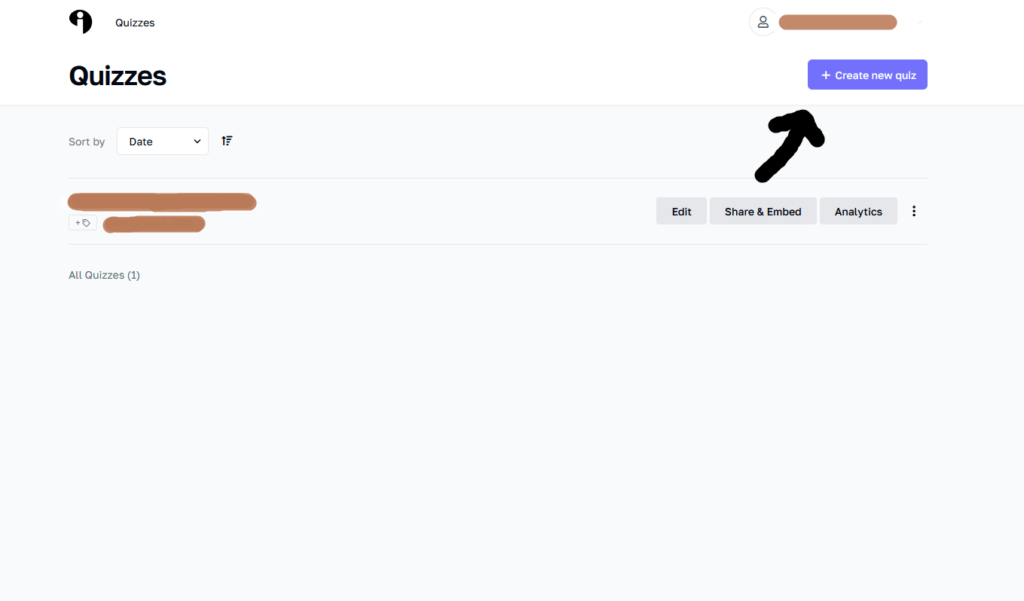
It’s usually found at the top corner. It’s the one with the freestyle black arrow pointing towards it. Hard to miss.
Step 2: Choose How You’d Like to Create Your Quiz
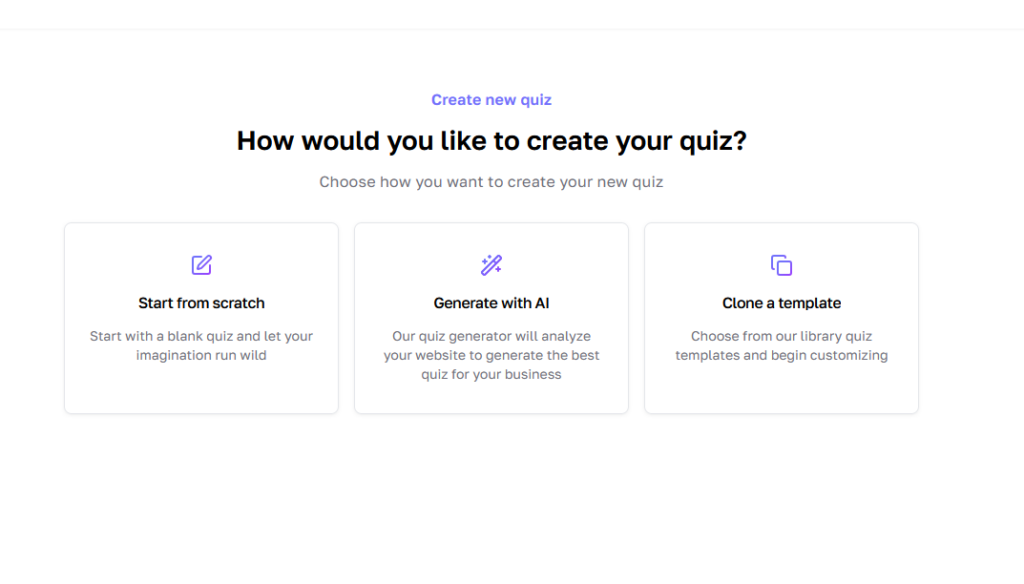
Start by selecting whether you want to create the quiz yourself, generate your quiz with AI, or clone a template. If you go with “Start from scratch,” it takes you to another page where you select your type of quiz.
Step 3: Select the type of quiz you’d like to create.
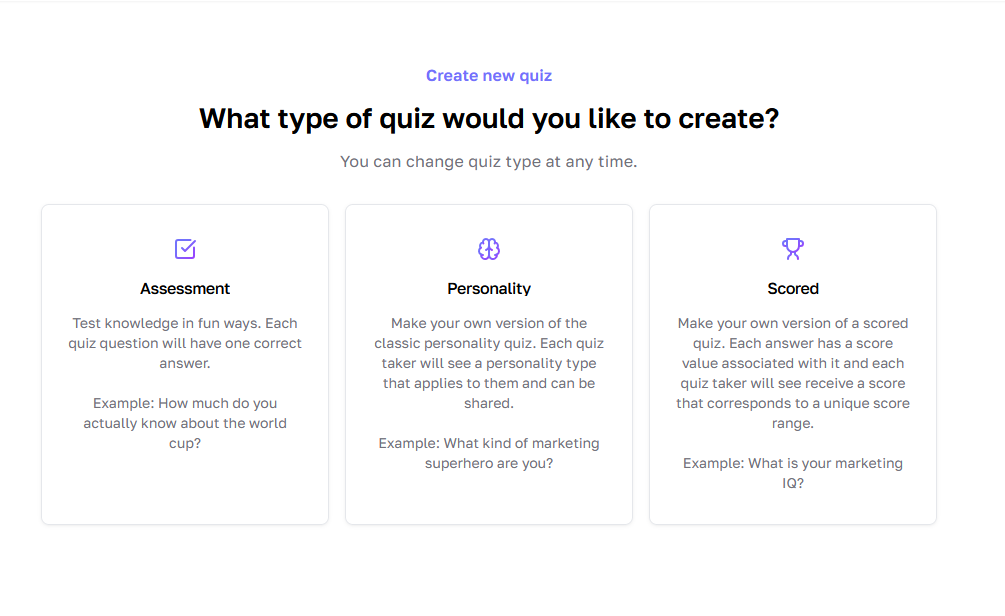
This will be one of the three (3) types we explained earlier.
Step 4: Create Your Topic and Select Your Cover Image
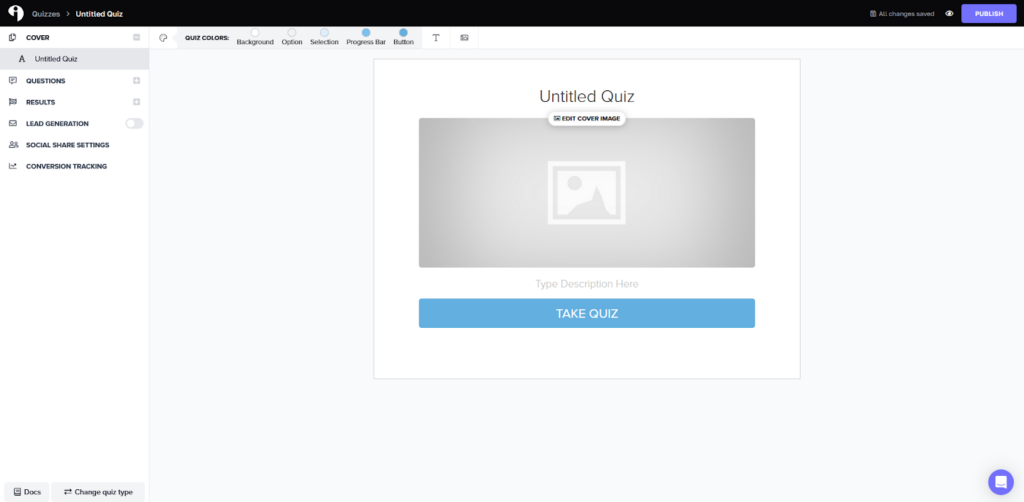
In no exact order, you can select your cover image by clicking on the “Edit Cover Image” section and also add a title in the “Untitled Quiz” section. Let’s go with the title “What Type of Startup Are You?”
When you click on the “edit cover image,” it shows a box that lets you search for a cover image, as shown below. Click on “FIND IMAGES,” and you can select your preferred image through the Unsplash integration already there, or even choose a GIF, powered by Giphy.
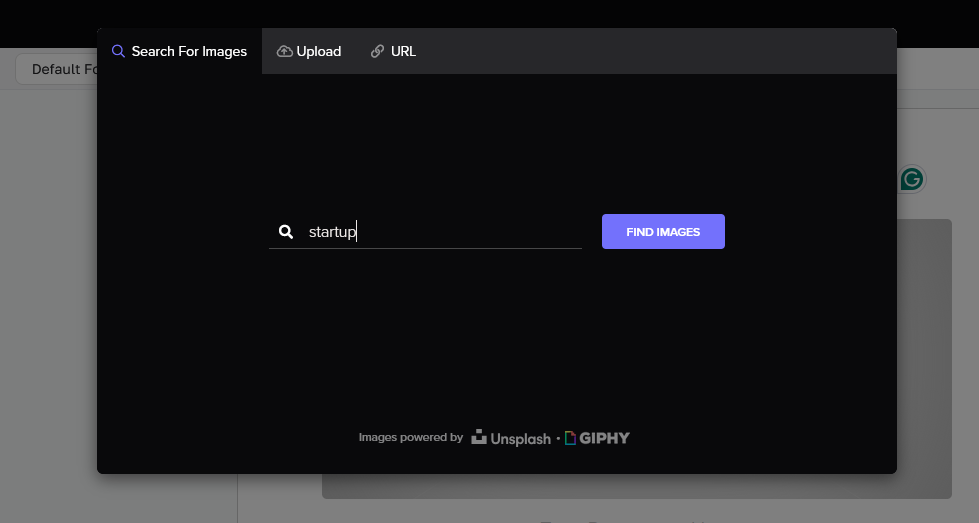
Of course, you can also upload an image from your device or by using a URL. Let’s just say you are spoilt for choice. Once you have selected the image, you crop it and save it.
Step 5: Create Your Quiz
Here is where the magic happens. Once you’re in the quiz builder, you’ll work through several key configuration areas. Add your questions and answer options, optionally including images to increase engagement.
Map each answer choice to specific result types so the platform automatically determines which outcome each quiz taker receives.
You can enable lead capture, connect your email platform, and configure tags or segments based on quiz results. You also get to decide if you want to customize shareable content so quiz takers can post their results on social media. Finally, you can monitor the completion rates, drop-offs, and lead capture performance to optimize your quiz over time.
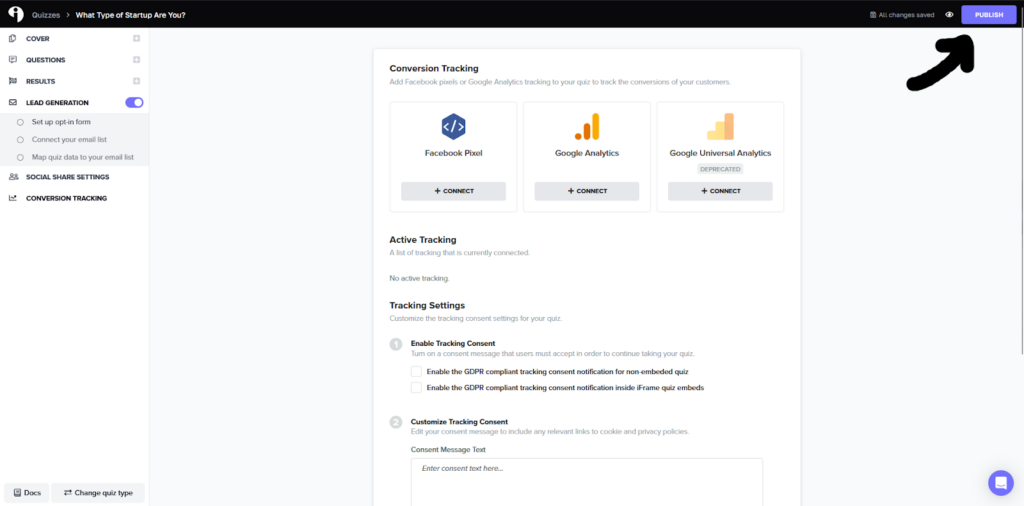
Once you are done with the tweaking, you can go ahead to click the “Publish” button at the top corner.
Step 6: The AI-Route
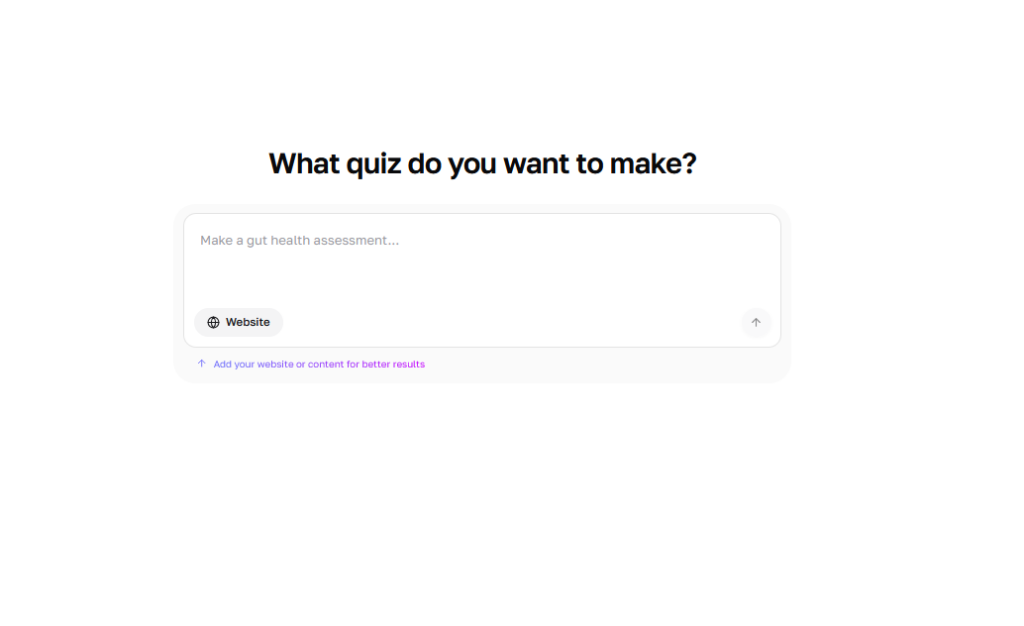
If you decide to go through the AI route, you’d be redirected to another page that asks you what quiz you want to make, and an option to add your website for a better understanding.
From here on, it’s smooth sailing; this AI approach gives you a number of optimized quiz titles, gives you a bunch of options on what you’d like the quiz to achieve, helps you determine specific results you want the quiz to achieve, lets you decide on your specific questions, and if you don’t have, it generates them for you.
Step 7: The Cloning Method
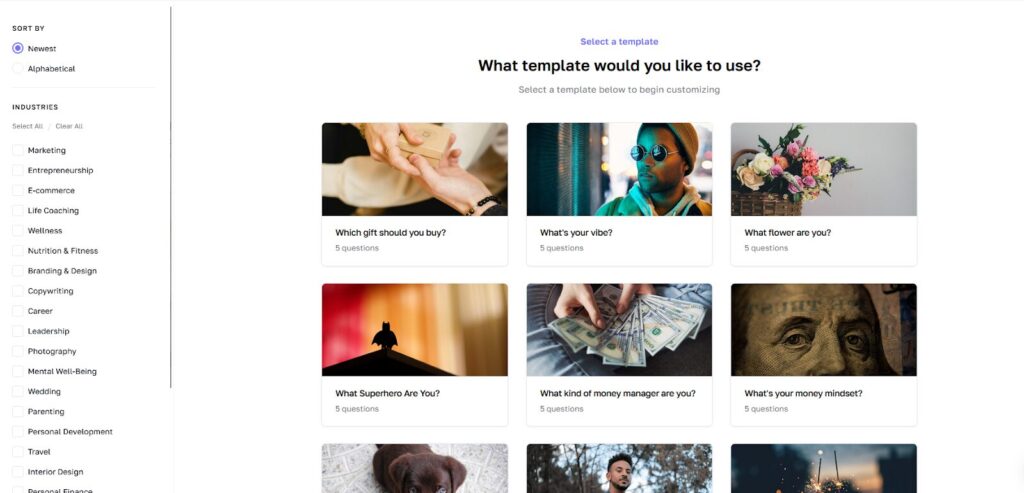
If you decide to create a quiz based on what people have used in the past, you have that option too. All you have to do is click on the template you want to use and tailor it to your taste.
You can better sift through the ones better suited to you by selecting your preferred niche using the “industries” section on the left.
Most users can complete this process in 30-60 minutes for their first quiz, then improve and optimize based on real-world data.
Tips for Creating a Splendid Quiz
To maximize your quiz’s effectiveness, keep these best practices in mind:
Make it about them, not you. The best quizzes focus on helping the user discover something valuable about themselves. Save your sales pitch for the follow-up emails.
Keep questions engaging and relevant. Every question should either segment your audience or increase engagement. If a question doesn’t serve one of these purposes, cut it.
Create results that feel personalized. Generic results kill quiz performance. Each outcome should feel like it was written specifically for that person, with specific insights or recommendations.
Include a clear next step. Your quiz results should naturally lead somewhere—whether that’s booking a call, shopping a collection, downloading a resource, or reading specific content.
Test different opt-in placements. Experiment with requiring emails before results versus making them optional after results. Different audiences respond better to different approaches.
Drive quality traffic. Your quiz conversion rate depends partly on traffic quality. Promote your quiz to audiences already interested in your topic.
Optimize based on data. Review your quiz analytics regularly. Where do people drop off? Which results are most common? Use this data to refine your questions and improve performance.
Make results shareable. Include social sharing buttons and craft result descriptions that people will want to share with friends or colleagues.
Interact’s Pricing
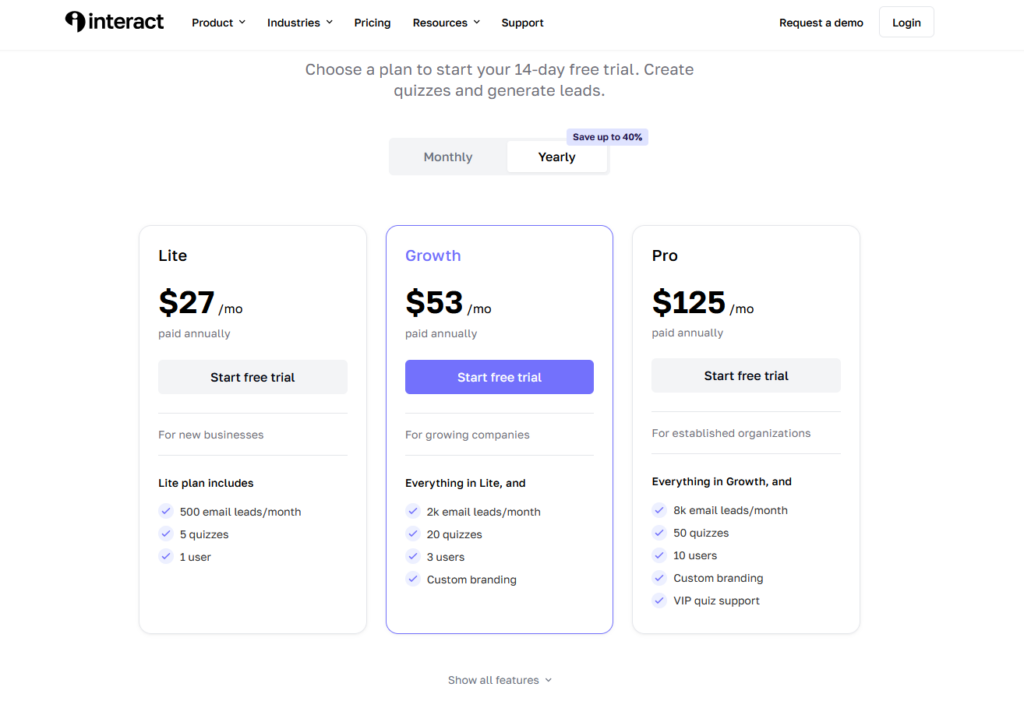
Interact offers several pricing tiers to accommodate different business needs and sizes.
Lite Plan – $39/month ($27/month paid annually): Designed for new businesses, this plan includes 500 email leads per month, 5 quizzes, and 1 user. It’s ideal for solopreneurs or small businesses just getting started with quiz marketing.
Growth Plan – $89/month ($53/month paid annually): Built for growing companies, this tier includes everything in Lite plus 2,000 email leads per month, 20 quizzes, 3 users, and custom branding. This is the most popular choice for businesses scaling their lead generation.
Pro Plan – $209/month ($125/month paid annually): For established organizations, the Pro plan offers everything in Growth plus 8,000 email leads per month, 50 quizzes, 10 users, custom branding, and VIP quiz support.
All plans include a 14-day free trial, and up to 40% savings on annual plans. For the most current pricing details and additional features, visit Interact’s pricing page directly.
Wrap Up
Interact represents a shift in how businesses approach lead generation. Interact has a long list of successful case studies to show how effective this approach has been over the years. By helping potential customers self-identify their needs through engaging quizzes, businesses can build email lists filled with segmented, qualified leads who’ve already expressed interest in specific solutions.
FAQs
How Long Does It Take to Create a Quiz With Interact?
Most users can create their first functional quiz in 30-60 minutes using templates or AI assistance. More complex quizzes with advanced branching logic may take longer, but the platform is designed for speed.
What Conversion Rates Can I Expect From My Quiz?
Realistic conversion rates range from 25-50%, depending on traffic quality, quiz topic, and how compelling your results are. You can check the data on conversion rates from diverse industries here.
Which Industries Benefit Most From Quiz Marketing?
While quizzes work across many sectors, they’re particularly effective for creators and coaches, course creators, service-based businesses, ecommerce brands, agencies, consultants, and wellness professionals—essentially any business that benefits from audience personalization.
Do I Need Technical Skills to Use Interact?
No. Interact is a no-code platform designed for marketers, not developers. If you can use basic software, you can create a quiz.
How Does Interact Integrate With My Email Marketing Platform?
Interact offers native integrations with major platforms (about 40 platforms), including ConvertKit, Mailchimp, Klaviyo, and ActiveCampaign, plus Zapier connectivity for additional options. Quiz data, including answers and results, automatically syncs to create tags and trigger automations.
Can I Customize the Quiz Design to Match My Brand?
Yes. Interact allows full customization of colors, fonts, images, and styling without requiring any coding knowledge.